Weather: Live Forecast & Radar
- 4.4
- Rating
- 500.00K
- Installs
- Free
- Price
 Analysis by App-foxy
If you want a straightforward way to check the sky before leaving home, Weather: Live Forecast & Radar is worth a look. I found it most useful as a quick daily weather app rather than something I would rely on for highly technical forecasting. Its purpose is easy to understand: open it, check the current conditions and forecast, then decide whether to carry an umbrella, change travel plans, or dress for the day.
That simple role matters because many weather apps try to do too much. They can bury the information people actually need beneath maps, alerts, widgets, advertisements, and layers of menus. This app, from JuXin Ltd, feels aimed at everyday decisions. It is free, rated for Everyone, and belongs to the weather category, so it is accessible to a broad audience, including someone installing this kind of app for the first time.
I would recommend approaching it as a practical companion for routines: checking the morning forecast, looking ahead before a trip, or making a quick outdoor decision. I would not treat it as a replacement for official emergency information during dangerous weather. That distinction is important, and it helps set realistic expectations from the beginning.
You May Also Like

 Blood Strike: 2.5 Anniversary
Blood Strike’s Loadouts Turn Every Drop Into a Tactical Gamble
A close look at Blood Strike’s custom loadouts: how fast access to signature weapons reshapes its battle royale rhythm, rewards preparation, and narrows the gap between fights.

 Pandora - Music & Podcasts
Pandora’s Music Is Easy to Start, but Harder to Recover
Pandora’s strength is its low-effort path from a seed to a station. Its weak spot is how much confidence it asks you to place in connection, setup, and quiet recovery.

 8 Ball Pool
 Is Built on Rivalries, Rematches, and Routine
A close look at the rivalries, rematches, shared routines, and unanswered safety questions that turn a quick pool match into a persistent mobile community.

 Samsung Music
’s Quiet Strength Is Playing What You Already Own
Its reach comes less from spectacle than from dependable access to a personal library. That simplicity is both the app’s strongest retention engine and its ceiling.

 AccuWeather: Weather Radar
AccuWeather Review: A Quick, Clear Forecast for Everyday Decisions
For everyday plans, the best forecast is the one you can understand quickly. AccuWeather makes rain timing, radar, and local conditions easy to act on, with a few trade-offs.

 Hill Climb Racing
Why Hill Climb Racing Still Turns Crashes Into One More Run
A tiny car, a bumpy hill and one more upgrade: Hill Climb Racing keeps resurfacing because its simple chaos makes every near-miss feel personal.
More From Our News Desk



What the first use feels like
After installing the app, my first instinct was to look for the current conditions and then move immediately to the forecast. That is the right way to use it. Rather than exploring every screen at once, I suggest starting with one question: “What do I need to know before I go out?” If the answer is whether the day looks wet, hot, cold, or unsettled, the app’s central purpose becomes clear very quickly.
The store summary presents it as a forecast tool for daily life, travel, and outdoor plans. In practice, those are three different levels of use. Daily life usually needs a quick glance. Travel requires checking several parts of the day and thinking about changing conditions. Outdoor plans need a little more caution because a forecast that looks comfortable in the morning may not remain comfortable later.
This is where I think the app is strongest for new users: it does not require you to understand weather terminology before getting value from it. You can begin with the broad picture and only dig deeper when a plan depends on timing. That makes the learning curve gentle, especially if your previous weather app felt crowded or confusing.
The app has an average rating of 4.1 from around 900 ratings, with over 100K installs. I see those figures as signs of a modest, established user base rather than proof that it will suit everyone. Weather preferences are personal. Some people want a clean glanceable forecast, while others expect radar layers, detailed meteorological charts, or extensive customization. Your expectations should decide whether this is the right fit.
Start with one location and one routine
For a first-time user, I recommend making the initial check part of an existing habit. Open it while preparing breakfast, before walking the dog, or just before leaving for work. Look at the current conditions, then check the rest of the day. This two-step routine is more useful than repeatedly refreshing the app without a specific decision in mind.
A useful trick is to compare what the forecast suggests with what you can see outside. If the sky looks bright but the later forecast appears unsettled, that is a reminder to plan for the whole day rather than only the next few minutes. If you are heading out for a short errand, the immediate outlook may matter most; if you are commuting, the later part of the day deserves equal attention.
I also suggest avoiding the temptation to judge the app from one forecast alone. Weather changes, and no forecast should be treated as a guarantee. The better test is whether the information helps you make ordinary decisions without slowing you down. For that purpose, the app is easier to appreciate when used consistently over several routines.
The first meaningful success
Your first successful action should be something concrete: decide whether to take a jacket, carry rain protection, or move an outdoor appointment earlier. That may sound basic, but it is exactly where a weather app earns its place. If you can open Weather: Live Forecast & Radar, understand the day at a glance, and make a sensible adjustment, you have already used it successfully.
For example, imagine planning a morning walk followed by an afternoon journey across town. I would check the forecast before leaving, note whether conditions are expected to change, and avoid assuming that the comfortable morning view represents the entire day. If the later period looks less suitable, I might carry an extra layer or change the timing. The app becomes valuable not because it makes the decision for me, but because it puts the relevant check in front of me quickly.
This workflow is also useful for parents, commuters, students, and anyone who spends part of the day outdoors. It keeps the app connected to a real action. Instead of opening it out of habit, you use it to answer a practical question.
The best first result is a better plan, not a longer weather session. That is the mindset I would encourage. A weather app should reduce uncertainty enough to help you act, while leaving room for changing conditions and common sense.
How to read the forecast without overthinking it
New users often make one of two mistakes. They either look only at the current conditions or they become distracted by every available detail. I prefer a middle path. First check what is happening now. Then check how the day develops. Finally, consider whether your own plan extends beyond the period that looks comfortable.
For a short trip, the broad forecast may be enough. For a long outdoor activity, I would check again closer to departure and avoid relying on a single glance several hours earlier. This is not a weakness unique to this app; it is simply a sensible way to use weather information.
Another practical habit is to separate comfort from safety. A forecast that helps you choose shoes or clothing is useful for everyday planning. Severe conditions, travel disruption, flooding, storms, or other hazards deserve attention from official local warnings as well. I would use this app for convenience and routine awareness, then consult authoritative emergency sources when the consequences are serious.
Where the app fits among familiar alternatives
Compared with a phone’s built-in weather panel, this app is appealing if you want a dedicated place to check the forecast rather than relying on a small glanceable element. A built-in option may be faster when you are already on the home screen, but a dedicated app can feel more intentional when you are preparing for a day out or checking conditions before travel.
Compared with large weather platforms, the main trade-off is focus. Bigger services often attract users who want extensive maps, storm tracking, detailed charts, or a wide range of personalization. If those tools are central to your decisions, you may prefer an alternative designed around specialist information. Weather: Live Forecast & Radar makes more sense for someone who values a direct daily check and does not want to turn every forecast into a research project.
I would also distinguish it from a simple search-engine weather result. A search result is convenient for a one-off question, but an installed app is better suited to a repeated routine. When you check conditions every morning or before several outdoor plans each week, having a dedicated weather destination can be more comfortable than starting a new search each time.
The word “Radar” in the app’s name may also shape expectations. If you install it expecting the depth of a specialist radar service, you should first decide whether its presentation gives you the level of detail you need. For ordinary planning, a quick forecast can be enough. For tracking a fast-moving storm or making a safety-critical decision, I would choose a service with clearly established official warning and radar capabilities rather than assuming the name alone guarantees specialist coverage.
Who will get the most from it
This app is a good match for people who want a free weather tool for everyday use and prefer a simple starting point. It can suit a commuter deciding what to wear, a family planning a park visit, a traveler checking the day before going out, or an occasional hiker who wants a convenient forecast check before leaving.
It is also a reasonable choice for someone who has never used a dedicated weather app. The basic workflow is easy to explain: open it, orient yourself to the current conditions, look ahead, and connect that information to your plan. You do not need to become a weather enthusiast to benefit from it.
I would be more cautious about recommending it to users who need professional-grade detail, specialized aviation or marine information, highly localized emergency guidance, or a carefully documented history of forecast performance. Those needs call for a different type of service. The app’s everyday focus is a benefit until your decisions require more technical depth.
Small frictions worth knowing before you settle in
The first possible friction is expectation management. A weather app can look simple while still leaving users wondering which part of the forecast deserves the most attention. My advice is to build a repeatable routine instead of searching for one perfect screen. Check the current situation, review the day, and revisit the forecast when your plan is important.
The second is the natural uncertainty of weather. If the forecast changes later, that does not automatically mean the app has failed. Conditions evolve, and forecasts are estimates. The sensible approach is to use the app as one input, especially when your activity is flexible, and to seek official warnings when conditions may be dangerous.
The third is that a broad daily view may not answer every specialized question. Someone planning a long, exposed outdoor activity might need more than a general forecast. In that situation, I would use this app as a first check, then move to a more specialized source before committing to the plan.
These limitations do not make the app poor. They define its best role. It is most convincing when it helps you make ordinary decisions quickly, not when you force it to act like a complete meteorological workstation.
Practical habits that make the app more useful
One helpful habit is to check before the decision point, not after it. If you wait until you are already walking out the door, a changing forecast may leave you with fewer options. Looking earlier gives you time to adjust clothing, transport, or timing.
A second is to check the forecast at the point where your plan changes. If you work indoors in the morning but travel outdoors later, the evening conditions may matter more than the morning sky. If you are planning a short outing, the immediate conditions may be sufficient. Matching the check to the plan prevents both underchecking and unnecessary overchecking.
A third is to treat the app as a planning aid rather than a promise. I find that this produces better decisions. Carrying a light extra layer because the forecast looks uncertain is often more sensible than assuming the first view will remain perfect all day.
Finally, use the app alongside local awareness. Buildings, hills, coastlines, and neighborhoods can make conditions feel different from a broad forecast. If what you see outside clearly conflicts with your plan, pause and reassess instead of following the screen blindly.
Version, cost, and everyday accessibility
The app is free, which makes it easy to try without committing money to a weather service. Its current version is 1.6.1.0, and it requires Android 9 or later. That requirement is worth checking before installation if you use an older phone, because compatibility matters more than any feature comparison when an app cannot run on your device.
Its Everyone age rating also makes it suitable as a general household weather tool. I can imagine it being used by different family members without the app feeling aimed at a narrow age group. The simple purpose helps here: checking the weather is a shared practical task, whether the user is preparing for school, work, travel, or an outdoor appointment.
JuXin Ltd has kept the product positioned as an accessible weather app rather than a specialist service. That is a sensible direction for a free download, but it also means the right question is not whether it contains every possible weather feature. The better question is whether it gives you enough information for the plans you actually make.
My recommendation after using it
I would recommend Weather: Live Forecast & Radar to a first-time user who wants a clear, free way to build a daily forecast habit. Start with one location, check the current conditions, look across the day, and use the result to make one small practical decision. That path gets you to value quickly without requiring a long setup process or deep knowledge of weather terminology.
For travel and outdoor plans, I would use it as an early planning step and check again nearer the time. For serious weather risks, I would add official local warnings rather than relying on any general-purpose app alone. For users who want advanced radar analysis or specialist forecasting, another service may be a better primary choice.
My overall view is positive but measured. This is not an app I would choose because I wanted to study weather systems. I would choose it because I wanted a convenient daily check that could help me leave the house better prepared. If that is your goal, the free installation and approachable design make it easy to try, and the app can earn a regular place in your routine without demanding much attention.
FAQs for Weather: Live Forecast & Radar
01What is Weather: Live Forecast & Radar used for?
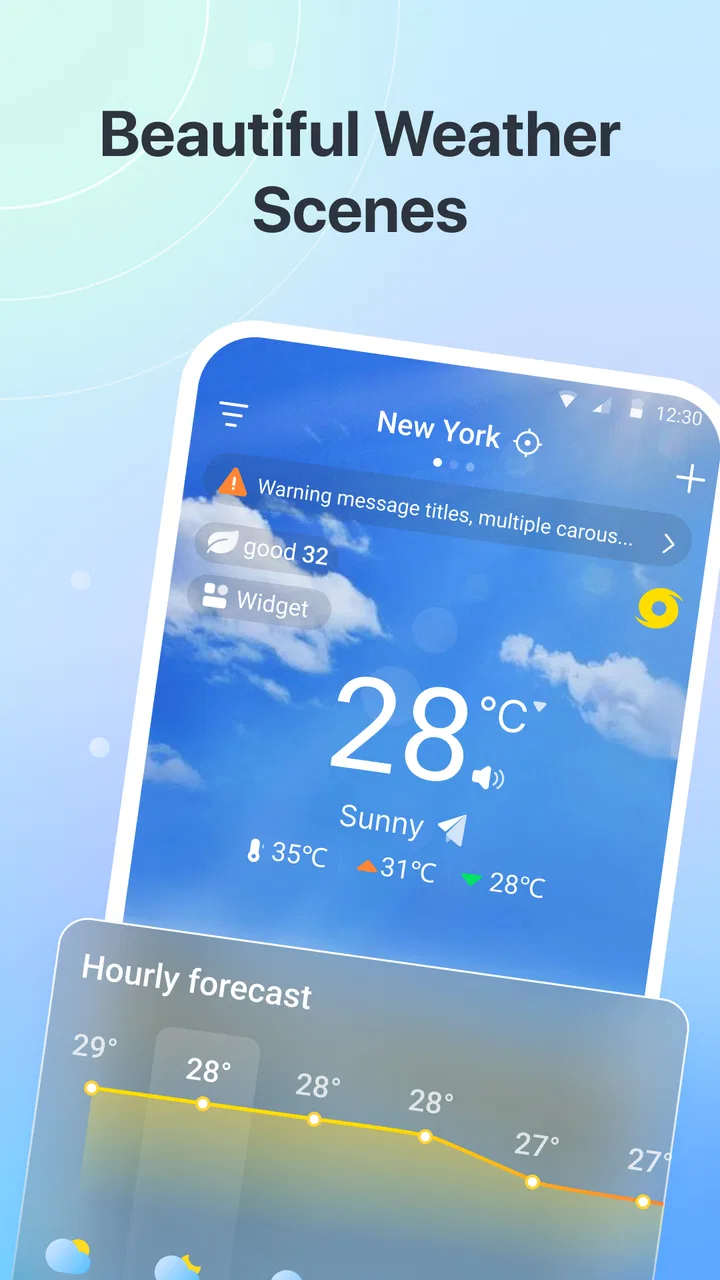
Weather: Live Forecast & Radar is designed to provide current conditions, hourly updates, daily forecasts, and radar-based weather information in one place. After setting your location, you can check temperature, precipitation chances, wind, humidity, and other details. It is useful for planning commutes, trips, outdoor activities, and everyday routines, although forecasts should not replace official emergency warnings.
02Does Weather: Live Forecast & Radar provide accurate forecasts?
The app generally offers a convenient overview of weather conditions by combining forecast data, radar imagery, and location information. Accuracy can vary depending on your region, the quality of available weather stations, and how far ahead you are checking. Short-term forecasts are usually more dependable than long-range predictions, so it is sensible to compare important alerts with local meteorological services.
03Does the app require location access to work?
Weather: Live Forecast & Radar can typically be used by searching for a city or entering a location manually, so continuous location access may not be essential. However, enabling location permissions makes it easier to receive automatic forecasts for your current area. Before granting access, review the permission options and choose whether the app may use your location only while open or in the background.
04Does Weather: Live Forecast & Radar include weather radar and severe-weather alerts?
One of the app’s main attractions is its radar-style weather visualization, which can help you follow rain, snow, and approaching precipitation around a selected location. Depending on your country and the available data sources, alert features may also warn about severe conditions. Coverage and notification timing can differ by region, so official government alerts should remain your primary source during emergencies.
05Is Weather: Live Forecast & Radar free to download, and does it contain advertisements?
The app may be available to install without an upfront payment, but free access can include advertising, optional subscriptions, or premium features depending on the version and platform. Some advanced radar layers, extended forecasts, widgets, or ad-free tools may require payment. Check the app-store listing and subscription terms before downloading, especially if you want to avoid recurring charges.
Pros
- Accurate hourly forecasts help with short-term planning.
- Interactive radar makes it easy to track approaching rain.
- Supports multiple saved locations for travel or family monitoring.
- Weather alerts can warn users about severe conditions.
- Clean interface presents key information without excessive clutter.
Cons
- Some advanced radar and forecast tools may require a subscription.
- Frequent notifications can feel excessive unless carefully customized.
- Forecast accuracy may vary significantly by location.
- The app can use noticeable battery and data during live radar updates.
- Advertising may interrupt the experience for free users.

Weather: Live Forecast & Radar
Gallery